
 The Winmail.dat file holds information for the Rich Text message format.
When you send a message to someone whose mail client doesn’t support Rich Text format (basically any other mail client which is not developed by Microsoft) or when it is improperly converted on the mail server, they will receive the message with the Winmail.dat file as an attachment.
- Winmail.dat and missing other attachments
- Prevent sending out a Winmail.dat attachment
- Solution 1 – Changing the default message format
- Solution 2 – Use Rich Text internally but not externally
- Solution 3 – Change on a per message basis
- Solution 4 – Change on a per contact basis
Winmail.dat and missing other attachments
 When a receiver, whose client doesn’t support Rich Text format, gets a message that has a Winmail.dat attachment, it could be the case that any other attachment that got sent with the message will be within the Winmail.dat file as well and therefore inaccessible for the receiver.
In most cases, simply renaming the Winmail.dat attachment to the actual attachment name will allow you to recover the attachment.
Therefor, it is important to prevent Outlook from sending out your emails with Winmail.dat attachments.
Prevent sending out a Winmail.dat attachment
 To prevent sending out Winmail.dat files, make sure you don’t send out Rich Text formatted messages to people who use a mail client other than Outlook as Outlook is basically the only mail clients which supports that format.
The following shows the message format order from best to least compatible with other mail clients:
- Plain Text
- HTML
- Rich Text
In other words; Only use Rich Text when you have an absolute need for it and know that the recipients mail client supports it.
Solution 1 – Changing the default message format
If you want to get rid of the Rich Text format default, you can change this in the following way;
- File-> Options-> section Mail-> option: Compose messages in this format
You can still easily change back to Rich Text on a per message basis if you have a need for it. For this, see solution 3 below.
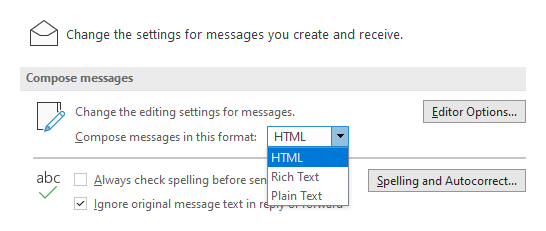
Changing the default message format in Outlook.
Solution 2 – Use Rich Text internally but not externally
If you prefer to use the Rich Text format for messages that you sent internally but want to send out in the HTML or Plain Text format for external contacts, you can set the following option:
- File-> Options-> Mail-> option group: Message Format-> option: When sending messages in Rich Text format to Internet recipients
Note:
Setting this option might not be needed for most Exchange environments as the Exchange server also holds this option and has it enabled by default. In that case, the conversion will take place at Exchange (server) level instead of at Outlook (client) level. In those cases it is also not possible to send out a Rich Text message to an external recipient even though the mail client of the external recipient supports it.
Solution 3 – Change on a per message basis
Regardless of your default preference, you can choose to change the message format to any other mail format when you have the need for it. Simply create a new message or use the Reply or Forward button and then follow the instructions below.
- Simplified Ribbon (Microsoft 365)
Format Text-> click on the ellipsis (…) button on the right-> Message Format - Classic Ribbon
Format Text-> option group: Format - Reading Pane Reply/Forward
Click on the Pop Out button above the message to open the email in its own window and then use one of the two methods mentioned above to change the message format.
Solution 4 – Change on a per contact basis
You can also change the default message format on a per user or even a per e-mail address basis.
Unfortunately, this method is quite buggy and you rarely get the “Open Outlook Properties” command via the following method. In that case, you use the workaround described below this method.
- Open the contact from your Contacts folder via a double click.
Right click on the email address of the contact and from the context menu select; Outlook Properties.
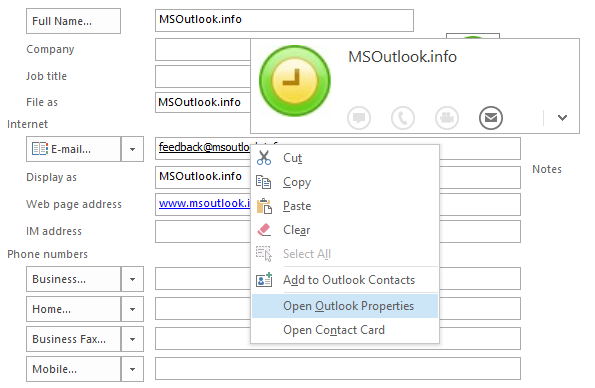
The Outlook Properties option for the contact’s address is located on the new Contact Card.In the Internet Format dropdown list choose the format you want to use for this specific contact’s e-mail address.
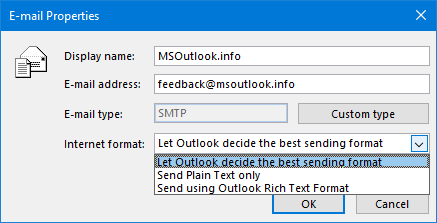
Changing the E-mail properties for the contact’s address.
Note:
Checking the E-mail Properties can also be the solution to prevent sending out a Winmail.dat file to a specific contact even though you are sending a message in the HTML or Plain Text format.
Solution 4 – Workaround
In case the regular Solution 4 doesn’t provide your the “Open Outlook Properties” command, then you can use the following method to reset the “Internet format” property to “Let Outlook decide the best sending format”.
- Open the contact from your Contacts folder via a double click.
- Remove the email address from the contact.
- Save and close the contact.
- Re-open the contact.
- Retype the email address of the contact.
- Do not copy past the address during step 2.
- When the email address is being suggested by AutoComplete, do not select the address from AutoComplete but delete the entry from there as well and make sure you actually type the address.
- Save and close the contact.
Additional workarounds can also be found at; E-mail Properties for contact addresses in Outlook 2013, 2016, 2019 and Microsoft 365.

