
 CRC (Cyclic Redundancy Check) errors are indicating errors with a specific file and in lot of cases with your hard disk.
It doesn’t indicate a problem with Outlook itself but a problem with the place on the hard disk where your pst-file is located.
When this occurs after you have just copied the pst-file (on disk, from network, from CD, by download) you should first verify that the original source still works and try to copy it again. If this has happened “all of a sudden” like in that it still worked yesterday, the issue can be either software based or hardware based.
Software based disk issues
 If the issue is software based you can usually fix it by running chkdsk (CheckDisk).
- Open an elevated command session. For instance via;
- Right click on the Windows Start button and choose; Windows PowerShell (Admin).
- Open the Start menu and type; Windows PowerShell.
Right click on the result and choose; Run as administrator.
- In the command session type;
chkdsk c: /f- Replace “c:” with the drive letter on which your pst-file is located.
When it tells you that it currently can’t check the disk and asks you if want to perform a diskcheck at next reboot choose Yes (Y) and reboot your computer.
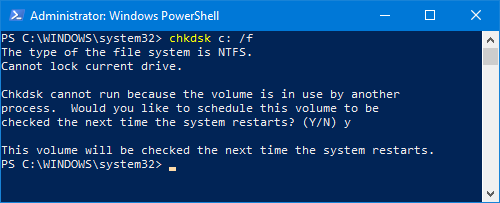
The chkdsk command is like a first aid kit for disk issues.
When you are done, run scanpst.exe against your pst-file to check if this fixed it.
Hardware based disk issues
 When the issue is hardware based, you are probably going to find Disk Errors in the System log of your Event Viewer. For instance via;
- Right click on the Windows Start button and choose; Event Viewer
- Start-> type; Event Viewer
Unless you’ve got a really old hard disk and/or motherboard they will probably both support S.M.A.R.T. In that case, you can then install a utility that monitors your disks health.
I often use SpeedFan for this as it is free and it also monitors your systems temperatures and fan speed (wow, where would that name come from?). However, many motherboard and disk manufacturers also have their own tools to check the health of a disk so you may want to check that out as well.
Most common attributes that are shown here and their meaning.
| Error | Meaning | In order to fix |
|---|---|---|
| UltraATA CRC Error Rate | when this got a low value it means more errors | try replacing the cabling |
| Read Error Rate | low values means that there is something wrong with the disk surface or the heads | replace the disk |
| Write Error Rate | low values means that there is something wrong with the disk surface or the heads | replace the disk |
| Recalibration Retries | low values means that there is something with the placing of the heads | replace the disk |
| Spin Retry count | low values mean that the disk has issues trying to spin up the disks at first attempt | replace the disk |
Recovery software
 If you find yourself in a situation where you cannot solve the issue via the methods above (because there is a true corruption on the hard disk) or when you’ve managed to recover the pst-file but no longer can open it or recover it via scanpst.exe, you can then try repairing or salvage recoverable items via a 3rd party recovery tool such as DataNumen Outlook Repair.
If you decide to order use DNC-PUXB-HT to get a discount.

