
 When composing a message in the HTML format in Outlook, the HTML code is automatically generated by the WordHTML engine. Unfortunately, Outlook does not provide a direct way of editing this generated HTML code.
With the EditHTML macro from this guide you can edit or completely replace the HTML of a message you are composing. This makes it much easier to make specific modifications or use the HTML code that you’ve created in another HTML editor.
This way you can make sure that your carefully created design, like for a newsletter, isn’t being modified again by WordHTML and remains compatible with other mail clients.
EditHTML macro
 The EditHTML macro allows you to easily edit the raw HTML source code while composing an email.
This enables you to make specific alterations to a certain section of your email, quickly import a HTML sample or fully replace the HTML of the message with a template (like for a newsletter) which you created in another application.
To prevent your code from being altered by the WordHTML engine, you can directly send the email from the HTML Editor so it will go out exactly as you intended.
By executing the EditHTML macro, you’ll open a dialog window which contains a Textbox to edit the HTML. Below this Textbox there are 3 commands to choose from;
- Apply
Any modifications that you’ve made to the HTML code is being applied to the message. Note however that further editing the message or even sending it could result in WordHTML restructuring or rewriting your HTML code. Usually, this doesn’t lead to any visual changes. - Apply & Send
If you really don’t want WordHTML to change your HTML again then this is your best pick. The macro will apply the HTML code from the HTML Editor to the message and sends out the message with the HTML exactly as you’ve put it in the editor. This is often needed for design heavy newsletters for which rerendering it with WordHTML could break the design for other mail clients.
The macro can only send it when you’ve specified at least one recipient and the subject for the message. You’ll get a reminder of this in case your forgot. - Cancel
This button does exactly what you expect it to do; It will not apply any changes that you’ve made in the HTML Editor to the message that you are composing and closes the HTTML Editor to return you to your message.

Email HTML Editor for Outlook dialog with the HTML of a new email message.
Quick Install
- Download this code-file (outlookhtmledit.zip) or copy the code below.
- Open the VBA Editor (keyboard shortcut ALT+F11).
- Extract the zip-file and import the
HTMLEdit.basfile via File-> Import… - Import the
HTMLEditForm.frmfile via File-> Import… - Sign your code so you won’t get any security prompts and the macro won’t get disabled.
- Add a button for easy access to the macro or press ALT+F8 and select the macro you want to execute.
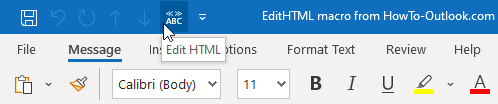
You can add a button for the EditHTML macro to the QAT or Ribbon of the New Email Compose window.
Macro code
The following code is contained in the zip-file referenced in the Quick Install. You can use the code below for review or manual installation.
'===============================================================================
'Description: Outlook macro to edit the HTML of an email that you are composing.
'
' author : Robert Sparnaaij
' version: 1.0
' website: https://www.howto-outlook.com/howto/edit-html-source-code-email.htm
'===============================================================================

Sub EditHTML()
    HTMLEditor ("Edit")
End Sub

Function HTMLEditor(ByVal Action As String)
    Dim objMail As MailItem, oInspector As Inspector
    Dim msgResult As Integer, msgText As String, msgTitle As String
    msgText = "This is not an editable email in HTML format."
    msgTitle = "Email HTML Editor"

    Set oInspector = Application.ActiveInspector
    If oInspector Is Nothing Then
        msgResult = MsgBox(msgText, vbCritical, msgTitle)
    Else
        Set objMail = oInspector.CurrentItem
        With objMail
            If .Sent Then
                msgResult = MsgBox(msgText, vbCritical, msgTitle)
            Else
                If .BodyFormat = olFormatHTML Then
                    Select Case Action
                        Case "Edit"
                            HTMLEditForm.HTMLTextBox.Text = .HTMLBody
                            HTMLEditForm.Show
                        Case "Apply"
                            .HTMLBody = HTMLEditForm.HTMLTextBox.Text
                            HTMLEditForm.Hide
                        Case "ApplySend"
                            If (.Recipients.Count = 0) Or (.Recipients.ResolveAll = False) Or (.Subject = "") Then
                                msgResult = MsgBox("Please specify the recipients and/or the Subject for this message first." _
                                        & vbNewLine & "Choose Apply or Cancel instead.", vbCritical, msgTitle)
                            Else
                                .Close olSave
                                .HTMLBody = HTMLEditForm.HTMLTextBox.Text
                                .Send
                                HTMLEditForm.Hide
                            End If
                    End Select
                Else
                    msgResult = MsgBox(msgText, vbCritical, msgTitle)
                End If
            End If
        End With
	Set objMail = Nothing
    End If
    Set oInspector = Nothing
End Function
The following code is used for the buttons in the “Email HTML Editor” Form.
Private Sub ApplyButton_Click()
    Call HTMLEdit.HTMLEditor("Apply")
End Sub

Private Sub ApplySendButton_Click()
    Call HTMLEdit.HTMLEditor("ApplySend")
End Sub

Private Sub CancelButton_Click()
    Me.Hide
End Sub
