
 Missing little things can be a big pain as well; like missing the new mail envelope in the Notification Area (also known as the System Tray).
This guide explains when to expect an envelope and what to do if it does not show.
- When should the envelope show itself?
- Make sure the option is selected
- Make sure the envelope isn’t hidden in the Notification Area
When should the envelope show itself?
 The envelope will show for messages that are delivered to the default Inbox for each account. When a message is caught by the Junk E-mail filter or moved by a rule, the envelope icon is not shown. The icon is also not shown for additional mailboxes which have been configured from a single Exchange account.
Note:
For manual Send/Receive actions and the first Send/Receive action after starting Outlook, the envelope icon is often not shown either.
Tip!
If you want a new mail alert for messages that have been moved by a rule, you can create a New Mail Alert rule.
Make sure the option is still selected
 If the envelope icon is not shown when you expected it to be shown, the first thing is to check if the option is still enabled;
- File-> Options-> section Mail-> option group: Message arrival-> option: Show an envelope icon in the taskbar
Note:
A common cause of how this option can become disabled is when you have previously right-clicked on the envelope icon in the Notification Area and then selected: Hide Envelope.
The proper way to temporarily hide the envelope is to mark a message as read in Outlook or to select an already read message and press CTRL+ENTER
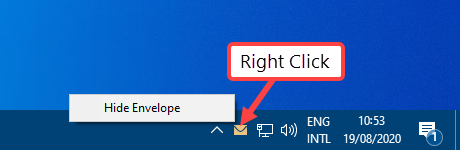
Hiding the envelope via a right click disables the option entirely.
Make sure the envelope isn’t hidden in the Notification Area
 Unused and inactive icons in the Notification Area are automatically hidden quite fast.
To view hidden icons, you can either expand the Notification Area to see the unused icons or configure the Notification Area to always show the envelope.
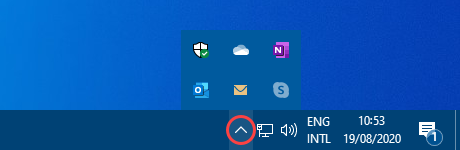
Customize your notifications in Windows 10.
Windows 7
To customize the Notification area icon in Windows 7 use;
- Start-> Control Panel-> Appearance and Personalization-> Taskbar and Start Menu-> button Customize…
- Find the envelope and click on the dropdown list and configure it from “Only show notifications” to “Show icon and notifications”
- Press OK twice to close the open windows.
Windows 8
To customize the Notification area icon in Windows 8 use;
- Right click on the Start Menu button-> Control Panel-> Appearance and Personalization-> Taskbar and Navigation-> button Customize…
- Find the envelope and click on the dropdown list and configure it from “Only show notifications” to “Show icon and notifications”
- Press OK twice to close the open windows.
Windows 10
To customize the Notification area icon in Windows 10 use;
- Start-> Settings-> Personalization-> Taskbar-> Select which icons appear on the taskbar
- Locate the entry for Microsoft Outlook that has the envelope icon.
- Click on the “Off” toggle button to set it to “On” so that the icon won’t get hidden automatically anymore.
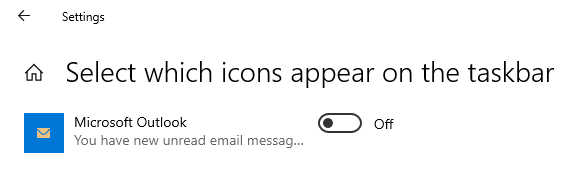
Set the Taskbar to always show the New Mail Envelope in the Notification Area.
Note:
The envelope icon is also shown on the Outlook icon itself unless you’ve set your Windows Taskbar to show small icons. This acts independently from the Notification Area setting.
 |  |  |
| Default icon | New mail icon | Small icon |

