
 The Outlook Social Connector is built into Outlook 2010 and Outlook 2013 and available as an add-in for Outlook 2003 and Outlook 2007. It allows you to get additional contact information from various Social Networking sites you might have signed up for.
In this article, you’ll find an overview of updates and available providers you can use in combination with the Outlook Social Connector.
Update:
The Outlook Social Connector and Providers are no longer supported by Microsoft or any 3rd party Social Media providers. Therefore, many of the links in this article are no longer available.
Outlook does still have the People Pane but this is considered a deprecated feature and could be removed in a future release.
- Download: Outlook Social Connector
- Download: Outlook Social Connector Providers
- Configure a provider
- Sending invites from Outlook
- Resources
Download: Outlook Social Connector
The Social Connector is a part of Outlook 2010 and Outlook 2013 and therefor isn’t offered as a separate download for these versions. However, for Outlook 2010, a major update to the Outlook Social Connector has been released which is the absolute minimal requirement to be able to use it.
For Outlook 2003 and Outlook 2007, the Outlook Social Connector has been made available as an downloadable add-in.
Download: Update for Outlook Social Connector for Outlook 2010 32-bit
Download: Update for Outlook Social Connector for Outlook 2010 64-bit
Download: Microsoft Outlook Social Connector for Outlook 2003 and Outlook 2007
View: June 9, 2015, update for Outlook Social Connector 2010 (KB2553308)
Note:
Since the Outlook Social Connector is part of Outlook 2010 itself, updates for it are also offered via Microsoft Update and the above update could already have been installed for you automatically. It is no longer available as a separate download.
Download: Outlook Social Connector Providers
Aside from the Social Connector, one or multiple Social Connector Providers are required to actually make a connection to a Social Networking site. Some ship with the Social Connector itself while others need to be downloaded and installed first.
Providers for Outlook 2013
Outlook 2013 ships with the connectors for Facebook, LinkedIn and SharePoint (My Site) and there are currently no additional providers available.
Providers for Outlook 2003, 2007 and 2010
Outlook 2003 and 2007 don’t ship with any providers and Outlook 2010 only ships with the SharePoint My Site provider.
The following Outlook Social Connector providers are available for Outlook 2003, 2007 and 2010:
MySpace(32-bit only)LinkedIn(32-bit available offered on the site, 64-bit as direct link here)Facebook (32-bit and 64-bit versions available)Windows Live Messenger (32-bit and 64-bit available)Viadeo (32-bit only)- Xing (Office Store add-in replacement which doesn’t rely on the Social Connector)
Note:
The 64-bit version is only needed for the 64-bit version of Outlook 2010. You’ll need to use the 32-bit version when using the 32-bit version of Outlook 2010 or any previous version of Outlook even when installed on a 64-bit version of Windows.
Configure a provider
After installing a provider, you’ll have to configure it in order to connect it to the social network with your credentials. To do this, use:
- Outlook 2003 and Outlook 2007
Tools-> Social Network Account Settings… - Outlook 2010
tab View-> People Pane-> Account Settings… - Outlook 2013
File-> Account Settings-> Social Network Accounts
Sending invites from Outlook
When you’ve received an email from someone you are not yet connected to via a Social Network, you can invite them directly from within Outlook.
To do this, expand the People Pane (if you had it minimized) and click on the “+” icon or the “Add” button in the bottom left corner of it.
Unfortunately, this feature isn’t that reliable for all providers and was therefor removed in Outlook 2013. To set up a connection with someone, it is best to use the website of the Social Network itself.
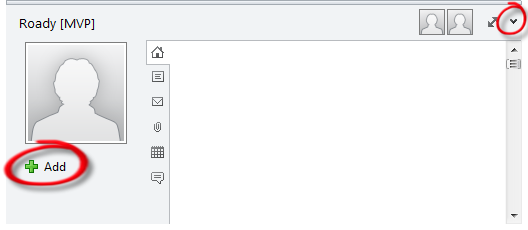
Click on the top right corner of the People Pane to expand it and send an invite to someone.
Resources
For more information about the Outlook Social Connector, see the resources below:
- Official Outlook Team blog: Use the Outlook Social Connector with Facebook, LinkedIn, MySpace and Windows Live!
KB article: Frequently asked questions about Outlook Social Connector- KB article: Turn on the Outlook Social Connector
- Microsoft Docs: Developing an OSC Provider: Synchronizing Friends and Activities

